Trade
Overview
TT Platform
Description
Task
Browser Access
Description
Task
Videos
TT Desktop
Description
Task
Videos
Reference
Workspace Windows
Description
Task
Videos
Widgets
Description
Task
Preferences
Description
Viewing Market Data
Time and Sales
Task
Reference
Description
Depth
Description
Task
Reference
Market Grid
Description
Task
Videos
Reference
Product Grid
Description
Task
Reference
Spread Matrix
Description
Task
Videos
Reference
Basic Order Entry
TT Order Types
Description
Task
Videos
Reference
Case Studies
TT Premium Order Types
Description
Task
Reference
Order Ticket
Description
Task
Use Cases
Reference
MD Trader®
Description
Task
Videos
Reference
Order Profiles
Description
Task
Reference
Routing Rules
Description
Task
Blocktrader
Description
Task
Videos
Reference
Trading Crypto on TT
Description
Task
Videos
Reference
Trading on B3
Order Management
Order Book
Description
Task
Reference
Floating Order Book
Description
Task
Reference
Fills
Description
Task
Reference
Positions
Description
Task
Reference
Orders and Fills
Description
Task
Reference
Audit Trail
Description
Task
Reference
Audit Query
Description
Task
Reference
Account List
Description
Task
Videos
Reference
Position Manager
Description
Task
Reference
Alert Manager and Alert Viewer
Description
Task
Videos
Reference
Account & User Restrictions
Description
Task
Reference
Balances
Description
Task
Reference
TT® OMS
Care Orders
Description
Task
Videos
Reference
Lock and Release
Description
Task
Bulking
Description
Task
Videos
Stitching and Splitting
Description
Task
Combining
Description
Task
Order Passing
Description
Task
Use Cases
Order Exceptions
Description
Task
Options
Options on TT
Description
Videos
Options Chain
Description
Task
Use Cases
Videos
Reference
Options Trade Monitor
Description
Task
Videos
Reference
Vol Curve Manager
Description
Task
Use Cases
Videos
Reference
Electronic Eye
Description
Task
Videos
Reference
RFQ Viewer
Description
Task
Videos
Reference
RFQ with Counterparties
Description
Task
Counterparty Manager
Description
Task
Strategy Creation
Description
Task
Use Cases
Reference
Options Risk
Description
Task
Videos
Reference
Options Risk Matrix
Description
Task
Videos
Reference
Watchlist
Description
Task
Videos
Reference
Expiration Manager
Description
Task
Volatility Calculator
Description
Task
TT Uncovered 2.0
Description
Task
TT Uncovered 3.0
Description
Task
QuikStrike
Description
Task
Spread Trading
Autospreader
Description
Task
Use Cases
Videos
Reference
Autospreader Rules
Description
Task
Videos
Reference
Hedge Manager
Description
Task
Videos
Reference
Trading in Yield
Description
Task
Use Cases
Reference
Aggregator
Description
Task
Videos
Reference
Algo Trading
Algo Dashboard
Description
Task
Videos
Reference
Template Manager
Description
Task
Order Management Algos (OMAs)
Autotrader
Description
Task
Reference
Videos
Excel integration with TT
Description
Task
Videos
Reference
Market-Making Algos
Analytics
Charts
Description
Technical Indicators
Task
Videos
Reference
Trader Analytics
Description
Task
Reference
ADL
ADL Overview
Introduction to ADL
Description
Task
Videos
Reference
ADL Basic Concepts
Description
Task
Reference
Building your first algo
Lessons
Advanced concepts
Description
Task
Case Studies
Jump blocks
Group blocks
Virtualized blocks
Library blocks
Trading Blocks
Discrete blocks
Arithmetic blocks
Basic blocks
Logic blocks
Miscellaneous blocks
Setup
Setup Overview
Getting Started
Description
Task
Videos
Reference
Supported Order Types and TIFs
Company Administration
Connections
Description
Task
Videos
Reference
Accounts
Description
Task
Videos
Use Cases
Reference
Users
Description
Task
Videos
Reference
Company
Description
Task
Reference
Order Tag Defaults
Description
Task
Account Administrators
Description
Task
TT Premium Services
Description
Task
TT Access
Description
Task
Advanced Features
Description
Risk Management
Risk Administration
Description
Task
Risk Limits
Description
Task
Videos
Reference
Pre-Trade Portfolio Risk
Description
Task
Reference
Order Cross Prevention
Description
Task
Videos
KRM Limits
Description
Task
TT® OMS
TT OMS Administration
Description
Task
Use Cases
Reference
Exchanges: Americas
B3
Description
Task
CBOE
Description
Task
Cboe FX
Description
Task
Reference
CFE
Description
Task
CME
Description
Task
Dealerweb
Description
Task
EBS Direct
Description
Task
EBS Market
Description
Task
Fenics
Description
Task
FMX
Description
Task
FMX_USTF
Description
Task
Goldman Sachs Commodity Blocks (GSCB)
Description
Task
Referece
ICE
Description
Task
MexDer
Description
Task
MIAX_FUT_CH
Description
Task
MIAX_FUT_NY
Description
Task
MX
Description
Task
Nodal
Description
Task
NFI
Task
Exchanges: EMEA
ATHEX
Description
Task
BIST
Description
Task
DGCX
Description
Task
EEX
Description
Task
EPEX SPOT
Description
Task
Reference
Eris
Description
Task
Eurex
Description
Task
Videos
Euronext
Description
Task
GFO-X
Description
Task
ICE_L
Description
Task
JSE
Description
Task
LME
Description
Task
LME NTP
Description
Task
LSE
Description
Task
MEFF
Description
Task
NDAQ_EU
Description
Task
NASDAQ_NED
Description
Task
Nord Pool
Description
Task
Reference
WSE
Description
Task
Exchanges: Asia/Pacific
ABX
Description
Task
ASX
Description
Task
FEX
Description
Task
HKEx
Description
Task
JPX
Description
Task
NSE
Description
Task
NZX
Description
Task
SGX
Description
Task
SGX GIFT
Description
Task
TAIFEX
Description
Task
TFEX
Description
Task
TFX
Description
Task
CoinFLEX
Task
Exchanges: Crypto
Coinbase
Description
Task
Kraken
Description
Task
FIX Support
FIX Ruleset
Description
Task
FIX Sessions
Description
Task
Secondary Accounts
Description
Task
Monitor
TT Mobile
TT Backtesting
APIs
TT REST API 2.0
Getting Started
API Reference
TT REST API 2.0 (UAT)
Getting Started
API Reference
TT .NET SDK
Getting started with TT .NET SDK
Creating the application framework
Working with instruments
Subscribing for market data
More about prices
An in-depth look at the Price class
Working with orders and fills
Handling trade subscriptions
Working with trade subscriptions
Working with Algos
Algo Server
TT Order Types
TT Premium Order Types
Advanced Concepts and Options
Appendix
TT CORE SDK
Getting Started with TT Core SDK
Creating Application Framework
Working With Instruments
Subscribing for Market Data
Working with Orders and Fills
Creating a TT Application Server
Appendix
TT Trade Surveillance
Overview
Using TT Trade Surveillance
Cluster View
Core Models
Market Abuse Models
Cross Product Models
Spoofing Models
Improperly Matched Trade Models
Market Rate Models
Trading Behaviors Models
Miscellaneous Models
Configurable Models
Reports
Reference
TT FIX Services
TT FIX General
Getting Started
FIX Message Structure
Session messages
TT FIX Order Routing
Overview
TT FIX message conversations
Supported application messages
TT FIX Market Data
Overview
TT FIX message conversations
Supported application messages
TT FIX Drop Copy Out
Overview
TT FIX Message Conversations
Supported application messages
Compliance Feed messages
TT FIX Drop Copy In
Overview
Supported application messages
TT FIX Gateway
Getting Started
FIX Message Structure
Components
Session messages
Price Gateway Messages
Order Gateway Messages
TT FIX Recovery
Overview
FIX Recovery Methods
Supported application messages
Compliance Feed Messages
MiFID II Support

TT Premium Order Types Overview

On this page

What is a TT Premium Order Type?

Similar to TT Order Types, the TT Premium Order Types use synthetic orders to manage the submission and execution of other orders in the market. TT Premium Order Types provide more robust order execution functionality than exchanges support natively. They offer order types not supported by exchanges or provide more options than exchange-native order types provide.

A TT Premium Order Type order comprises two parts:

  • A synthetic parent order that runs on an Algo Server that is usually co-located with the exchange on which the instrument trades. The parent order manages the entry and execution of its child orders.
  • Native child orders that are sent to an exchange for order execution based on the selected TT Premium Order Type and its configuration parameters.

Note: At this time, TT Premium Order Types are not available in the Prod-SIM environment.

TT Premium Order Type Features

TT Premium Order Types offer the following features:

  • Historical/Empirical Trade Distributions: Automated child order sizing based on synthetic objective and product to blend in with “normal” market activity.
  • Matching Engine Awareness: Product-specific order sizing logic with respect to Pro-Rata, FIFO, Split, etc. for optimal interaction with exchange matching algorithm.
  • Product-specific Forecasting: Volatility and volume forecasts driving benchmark order logic include built-in awareness of seasonality and events to optimize forecasts.
  • Multiple Benchmark Strategies: Variety of benchmark order types allows for aligning execution with the overall trading objective.
  • Post-Trade Analytics: Performance reports and reviews with product experts to review, discuss and optimize usage for continuous improvement of execution processes.
  • Simplified Trading Workflow: Create templates and custom action buttons for one-click initialization minimizing workflow interruptions.

Prerequisites

FIX Order Gateway

Access to TT Premium Order Types requires a dedicated FIX Order Gateway. Please contact our Sales team to discuss connectivity options and setup.

Enabling User’s Access

Prior to using any TT Premium Order Type, your administrator must enable access by updating the settings at the user level in the User Account Permissions settings or at the account level using the Account Restrictions settings in Setup.

Setting the Order Cross Prevention Rules

TT strongly recommends that accounts both enabled for the TT Premium Order Types and using account-level Order Cross Prevention, should utilize the Cancel Resting (wait for ACK) option to avoid parent orders from being cancelled.

Using the Reject New option may cause parent orders to be cancelled due to excessive rejects preventing the order from progressing.

The Cancel Resting (wait for ACK) option may have child orders receive unsolicited cancels if interacting with Order Cross Prevention, and this will result in new orders being issued in place of those which were cancelled. The unsolicited cancellations will not result in a cancellation of the parent order.

For more information on Order Cross Prevention Rules, refer to the Order Cross Prevention section of the Setup help.

Note: Firms may consult with their TT Onboarding representative with any questions regarding how these settings may impact their overall account structure.

Available TT Premium Order Types

The following table lists all order types available on the TT platform. However, the User Account Permissions in TT User Setup determines the actual order types shown in order entry widgets.

TT Order Type Description
TT Brisk Attempts to fill the parent order closer to when the order enters the market based on the order’s Start Time.
TT Close Attempts to fill the order closer to the order’s end time price.
TT POV Tracks and reacts to real-time market volumes to target a user-defined participation rate.
TT Prowler Combines enhanced iceberg, pegging and sniping capabilities into an order type that allows the user to customize values such as the minimum and maximum amounts to show in the market.
TT Scale POV Tracks and reacts to real-time market volumes to target a user-defined dynamically adjusting participation rate.
TT Splicer

Execute synthetically defined spread instruments according to selected Sub-strategy behavior while controlling the risk of diverging from the hedge ratio.

Note: Available Sub-strategies include: TT Brisk, TT Close, TT TWAP+, and TT VWAP+.

TT TWAP+ Executes a desired order at a steady rate across the order’s time horizon.
TT VWAP+ Uses historical intraday volume patterns to create a trade schedule that attempts to minimize market impact while tracking closely to the volume weighted average price over the execution horizon.

TT Premium Order Type order lifecycle

The basic lifecycle for a TT Premium Order Type order is as follows:

  1. When creating an order, a TT Premium Order Type is selected within an order-entry widget and its parameter values are specified in the order type fly-out.

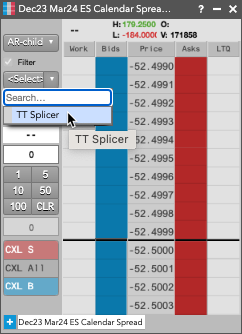
    Note: When creating a TT Splicer order, a synthetic TT Splicer instrument is created from the Autospreader widget by selecting the TT Splicer formula and populating the leg information.

  2. A TT Premium Order Type order is submitted from the TT platform.
  3. A synthetic parent order is created for the TT Premium Order Type on an Algo Server co-located with the exchange.
  4. The synthetic parent order submits child orders to the market as dictated by the specific TT Premium Order Type.

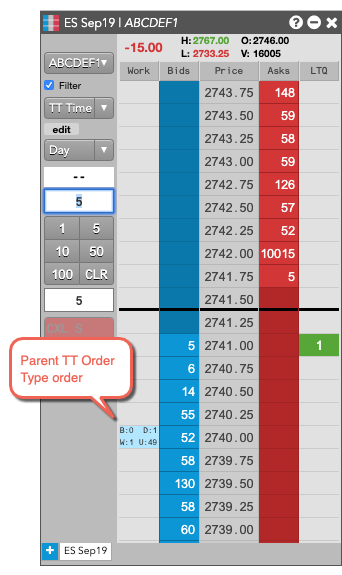
    In the Order Book, the parent synthetic order is listed, followed by each of the child orders it submitted.
  5. As fills for the child orders are received, the parent order updates its working and filled quantities.
  6. It also sends the fill acknowledgments back to TT to order entry and order management widgets, such as MD Trader and Audit Trail. Note: When filled, a synthetic parent fill is reported for every native child order fill.
  7. When all of the child orders have finished working, the parent TT Premium Order Type order is fully-filled and is removed from the Algo Server.

Accessing TT Premium Order Types

You can access TT Premium Order Types in two ways: you can select a TT Premium Order Type from the Order Type drop-down in the MD Trader or Order Ticket widgets.

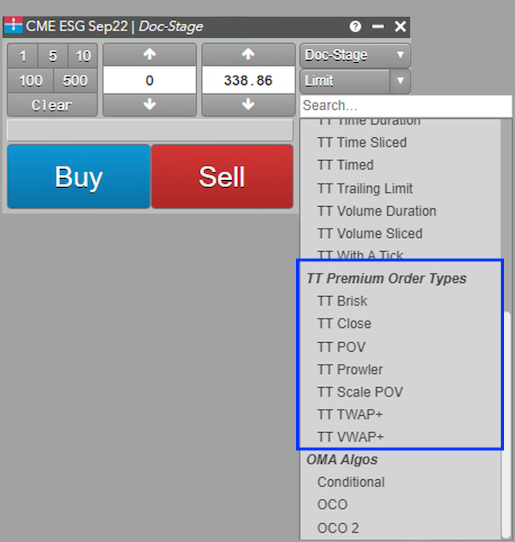
Note: When you are launching a TT Splicer order, after creating the spread in Autospreader, the only available order type in the drop-down will be TT Splicer. You must click TT Splicer to continue submitting the order.
Configuring TT Premium Order Type orders

Each TT Premium Order Type displays a fly-out with its associated parameters when selected as the order type. You can enter the desired parameter values as well as save them as re-usable templates.

When using the Order Ticket, the parameters are displayed in an embedded panel. Based on the TT Premium Order type.

Placing a TT Premium Order Type order

To enter a TT Premium Order Type order:

  1. In the MD Trader® or Order Ticket widget, choose the contract to trade.
  2. Enter the desired order quantity and price for the order.
  3. Select the desired TT Premium Order Type from the order type drop-down.
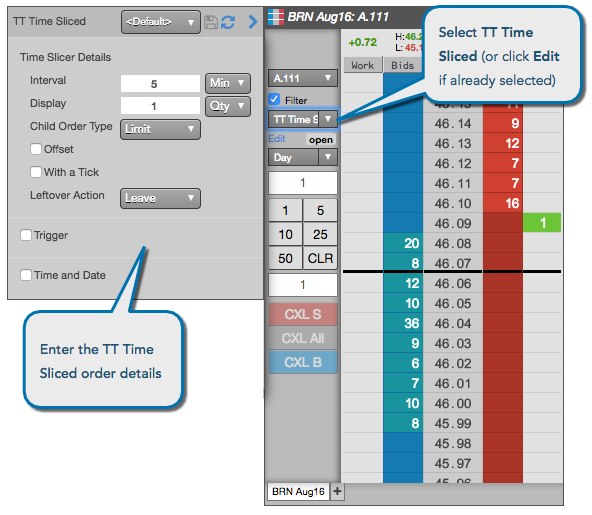
  4. Specify the desired parent order parameters.
  5. Click OK to close the parameters dialog.
  6. Click Buy or Sell to submit the order.

    The parent order is added to the widget.