










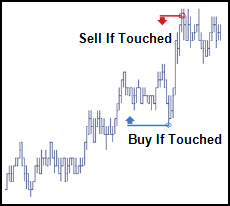
An If-Touched is an order that is triggered when the market has reached or traded through a specified price in the market. If-Touched orders are similar to Stop orders except the trigger price behavior is inverted. An If-Touched trigger price is typically set better than the current market.
Buy If-Touched orders are generally placed below the current last traded price while, Sell If-Touched orders are generally placed above the current last traded price.
The following is an example of a Trailing If-Touched order that triggers when a trade occurs and there is available quantity at the selected last traded price. Once triggered, the TT If-Touched order submits a child order placed three ticks into the market relative the LTP.

TT If-Touched order parameters
Trigger details parameters
-
Trigger Price: Sets the price at which to trigger the parent synthetic order.
Possible values include:
- LTP: Last Traded Price
- Ask: Best Ask
- Bid: Best Bid
- Same Side: Evaluates the trigger using the inside market price in the Buy/Sell direction of the order:
- Best Bid for Buys
- Best Ask for Sells
- Opposite Side: Evaluates the trigger using the inside market price in the opposite Buy/Sell direction of the order:
- Best Ask for Buys
- Best Bid for Sells

Note: If you click a custom action button (or use a hotkey) for this TT Order Type that also specifies an order template, these two fields will not be displayed, as the template already defines their desired values. Right-clicking on the button displays these parameters. You can also click the edit button to make changes, if desired.
- Executed quantity when the Price Type parameter is LTP
- Quantity of the best ask when the Price Type parameter is Ask
- Quantity of the best bid when the Price Type parameter is Bid
- Trigger Price: Sets the price at which to trigger the parent synthetic order.
Possible values include:
- LTP: Last Traded Price
- Ask: Best Ask
- Bid: Best Bid
- Same Side: Evaluates the trigger using the inside market price in the Buy/Sell direction of the order:
- Best Bid for Buys
- Best Ask for Sells
- Opposite Side: Evaluates the trigger using the inside market price in the opposite Buy/Sell direction of the order:
- Best Ask for Buys
- Best Bid for Sells
- Executed quantity when the Price Type parameter is LTP
- Quantity of the best ask when the Price Type parameter is Ask
- Quantity of the best bid when the Price Type parameter is Bid
- Limit order
- Market order
- LTP: Last Traded Price
- Ask: Best Ask
- Bid: Best Bid
- Trigger: Trigger price
- Same Side: Evaluates the trigger using the inside market price in the Buy/Sell direction of the order:
- Best Bid for Buys
- Best Ask for Sells
- Opposite Side: Evaluates the trigger using the inside market price in the opposite Buy/Sell direction of the order:
- Best Ask for Buys
- Best Bid for Sells
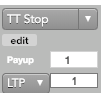
Note: If you click a custom action button (or use a hotkey) for this TT Order Type that also specifies an order template, these two fields will not be displayed, as the template already defines their desired values.Right-clicking on the button displays these parameters. You can also click the edit button to make changes if desired.
- Qty for an absolute number of contracts
- % for a percentage of the initial quantity for this order
Timing parameters
- Start: Sets the date and time to start executing the order.
Values include:
- Now to start the order immediately
- Time to display a date/time picker for you to indicate when to start the order
- Pre-open to enter the order at the pre-open state defined by an exchange
- Open to enter the order when the exchange opens its trading session
- End: Sets the time to stop executing the logic of the order
Possible values include:
- GTC, which leaves the order working until canceled
- Time, which displays a date/time picker for you to indicate when to stop the order
- Day, which leaves the order working until the market closes
- At End Action: Sets the action to take for any unfilled balance when the End time is reached. Visible only for a custom End time.
Possible values include:
- Cancel — Cancels all child orders and stops the order type.
- Go to Market — Cancels the resting Limit order and submits a Market order. When selected, the “Mkt Order Lmt ticks” option is displayed.
- Mkt Order Lmt ticks — Sets the number of ticks from LTP to submit a Limit order through the opposite inside market. If the checkbox is checked: all child orders are canceled, a Limit order is submitted for the unfilled quantity at a price that’s a set number of ticks from LTP, and the order type is stopped. If the checkbox is unchecked: all child orders are canceled, a Market order is submitted for the unfilled quantity, and the order type is stopped.