










Instead of username and password, applications written with TT Core SDK must provide an application key / secret pair for authentication. An application key / secret pair is a proxy for a user. Application keys for TT Core SDK applications are created in the TT Setup application. For more information, see Creating and managing application keys in the TT User Setup Help.
Creating a server-side application key/secret pair
Users can create an application key / secret pair from within Setup in the TT Platform as follows:
- In Setup, click Users in the left navigation panel and select your username in the data grid.
-
Click the App Keys tab, and then click New in the App Keys
title bar.

-
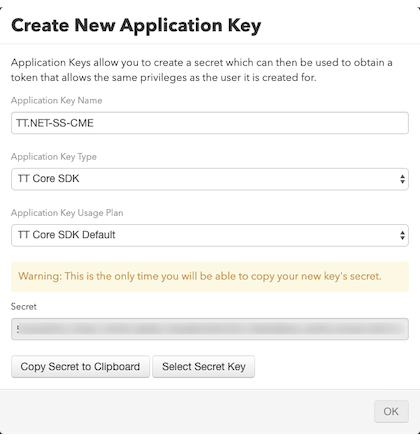
In the Create New Application Key dialog:
- Enter a unique name for your TT CORE SDK application.
- In the Application Key Type dropdown, select TT.NET SDK Server Side mode / TT Core SDK .
- In the Application Key Usage Plan dropdown, select the desired plan.

-
Click Create.
The application key is generated and the application secret
is displayed in the Secret field.
-
Click Copy Secret to Clipboard and then
paste this application secret somewhere safe. You will need
to provide them during the initialization of your TT .NET
SDK application.
Warning : This is the only time you will
be able to copy your new key’s secret.

- To exit and close the Create New Application Key screen, click OK .