



Overview
Trading Technologies provides a Fill and Audit Trail Service that periodically collects your TT fill or audit trail data in a CSV file, and makes each file available for retrieval via a secure portal known as Enhanced File Transfer (EFT). When the service is activated for a company, TT downloads the fill and audit trail files in secure, customer-specific repositories on the EFT site, and provides each customer with unique credentials to allow access to this data.
To activate the Fill and Audit Trail Service, please contact TT Onboarding ([email protected]). When contacted, a TT Onboarding Manager will activate the service for your company in TT, and notify you when the files are available for retrieval.
Fill and Audit Trail filenames
Files downloaded to the EFT site have the following naming convention:
Fills filename: TTFills_{ddmmyy}.csv. For example: TTFills_220618.csv
Audit Trail filename: TTAudit_{hhddmmyy}.csv. For example: TTAudit_15251119.csv
Fill and Audit Trail file format
Each fill or audit trail download is provided as a single CSV file as shown.

Accessing your Fill or Audit Trail files
Your files can be retrieved via an EFT server, which can be remotely accessed via a SSH / SFTP client or web browser (HTTPS). Both methods are encrypted and each client has their own unique user ID. Authorized users will be given a username and password to access the EFT service. Please contact TT Onboarding ([email protected]) to request a username and password.
To connect via SFTP: https://eft.tradingtechnologies.com
- Default port: 22
- Input supplied credentials
To connect via a web Browser: https://eft.tradingtechnologies.com
- Default port: 443
- Login using your unique user credentials and double-click on each archive that you would like to download.
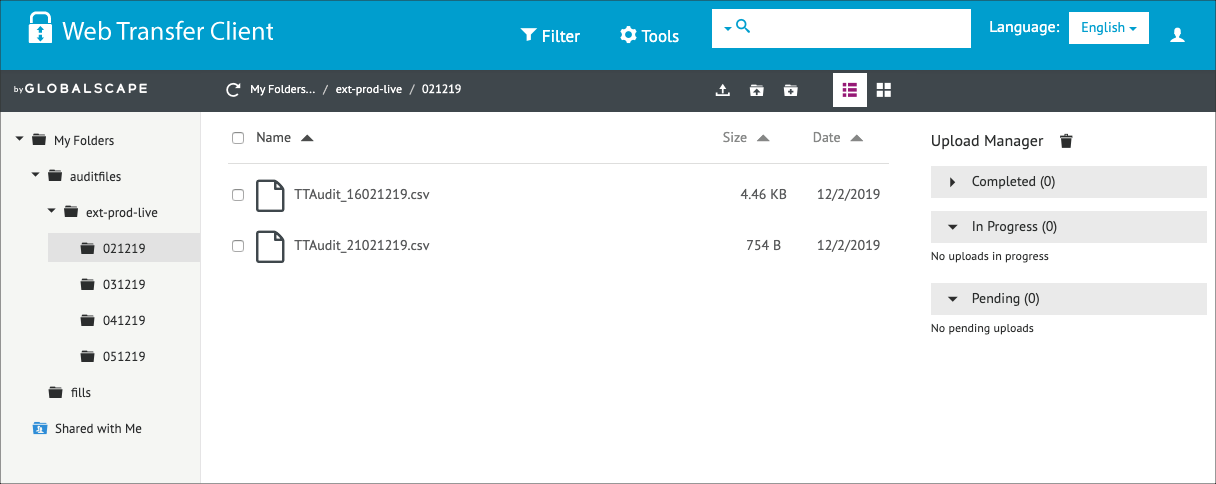
The following figure shows a sample file hierarchy on the server.
Fill and Audit Trail file availability
When activated, the Fill download is delivered to the EFT site every 15 minutes. Audit Trail files are delivered on a daily basis and are available by 2:00AM for the preceding day’s activity. Audit Trail files are placed in a folder named by date using the “DDMMYY” naming convention (e.g., 021219).
Automating file collection
It is highly recommended that you automate the daily collection of your compliance data, leveraging the SFTP protocol by creating a simple script or batch. EFT also supports the use of encrypted SSH keys which can be generated upon request. Using SSH key authentication rather than a standard password entry can help with automation, and ensure the whole process remains non-interactive.
If you would like to leverage connectivity via secure SSH keys, please contact TT Onboarding ([email protected]) for further assistance.
Fill column descriptions
Refer to the following table for a description of each Fill column included in your fills CSV file.
| Setting | Description |
|---|---|
| Account | Account number associated with the transaction. |
| AcctType | Account type code that defines the trader’s relationship with a clearing house |
| AlgoName | For TT synthetic and algorithm orders, the name of the algorithm controlling the order. |
| B/S | Whether the transaction represents a Buy or Sell order |
| Broker | The broker ID that is associated with the order. |
| C.D.I. | Commodity Derivative Indicator. Indication of whether the order is for hedging purposes to reduce risk. |
| ClearingDate | The clearing date is the date on which the transaction is settled. |
| Client | Client. Identification of the customer (Short Code). |
| ClOrderID | Unique identifier for the order assigned by the client and sent to the exchange. |
| Compliance Text | Text field available to include additional values for compliance. |
| Confirmed | Contains the Confirm button used for confirming fills. |
| ConnectionID | ID of the connection used to route the order or fill. |
| Contract | The name and contract expiry for the instrument or strategy. |
| CounterParty | Shows the Participant ID and account number of the counterparty that you submit the order on behalf of. |
| CurrentUser | TT user name of the trader associated with the transaction or owns a staged order. |
| D.E.A. | Direct Electronic Access. Shows whether or not the order is sent from direct/sponsored access, or from another source. |
| Date | Date the transaction occurred or the message was sent.
|
| DealDate | The date manually set by the user in the Deal Time field prior to sending the block trade to the exchange. |
| DealTime | The time manually set by the user in the Deal Time field prior to sending the block trade to the exchange. |
| ExchAcct | Account ID assigned the user by the exchange. |
| Exchange | Name of the exchange. Note: For parent TT order type orders, an asterisk “*” is appended to the exchange name in this column (e.g., CME *) to indicate the intended destination of the submitted parent order. No asterisk appears in the Exch column for the related child orders sent to the exchange. |
| ExchDate | The date the trading host received/sent the message. The date is displayed based on the timezone of the user’s workstation. |
| ExchOrderID | ID of the order, supplied by the exchange. |
| ExchTime | The time at which a fill is received by the exchange host or exchange gateway, depending on the practice of the exchange. The time is displayed based on the timezone of the user’s workstation. |
| ExchTransID | The transaction ID generated by and received from the Exchange. |
| ExchTrd | The exchange trader ID part of the user’s MGT gateway login. |
| ExecDec | Execution Decision ID. Indicates the user or firm that submitted the order. Enter a registered ID/Short Code. |
| ExecDecQ | Execution Decision Qualifier. The Order Tag Default qualifier for the ExecDec field as part of MiFID compliance. |
| ExeQty | Executed quantity (sum of fills) of an order |
| Expiry | The contract expiration date. If an option to buy or sell the underlying is exercised, it must be exercised on the expiration date or anytime prior to the expiration date depending on the type of contract. |
| FillQty | The quantity filled in the order. |
| FillType | Indicates whether fill corresponds to an outright, a spread, a spread leg, or a synthetic fill. |
| GiveUp | Account of the give-up party |
| InstrumentID | A unique code generated by TT to identify the instrument in the TT system. |
| InvestDec | Investment Decision. A Short Code as an indication of who made the trading decision. |
| InvestDecQ | Investment Decision Qualifier. The Order Tag Default qualifier for the InvestDec field as part of MiFID compliance. |
| LiqProv | Liquidity Provision. Indication of market making. |
| ManualFill | Whether the fill is a result of a:
|
| MaturityDate | The maturity date is the date on which the principal amount of an instrument becomes due. |
| Modifier | The modifier applied to the order. Example: Stop, If Touched, Trailing Stop, Trailing IT, Trailing Limit, Machine Gun |
| O/C | Type of position you are establishing with the order. |
| OMAOrderID | ID that uniquely identifies the OMA (Order Management Algo) order associated with the transaction. |
| OrderProfile | Displays the applied order profile for the order or fill. Only profiles that were configured in Setup will populate in this column. Locally created profiles will not appear. Note: The “ProfileName” column in the Order Book displays the order profile ID (e.g., <109>) when the profile name is not available to the user. In Setup, Profile IDs for your company are listed in the data grid “ID” column on the More | Profiles tab. The column is hidden by default and can be shown using the “Grid Options”. |
| OriginalDate | The original date the order was sent. |
| OriginalTime | The original time the order was sent. |
| Originator | TT User ID of the person who submitted the order or staged order |
| P/A | Whether a Brokertec order is passive (PA) or agressive (AA). |
| P/C | Indicates whether an options contract is a Put (P) or a Call (C). |
| P/F | Fill indicator: P = partial fill, F = full fill. Note: Not all exchanges provide partial fill indicators. |
| ParentID | TT-generated ID that uniquely identifies a parent order. The ID is also associated with all of its child orders. For example, if you submit a TT Iceberg order, the ParentID of each child order will contain the TTOrderID of the parent Iceberg order. |
| Price | Price of the order or fill. |
| PriceInTicks | Price in ticks is a rounded value that shows the given leg price as number of ticks. |
| ProdType | Type of product (e.g. Futures, Options). |
| Product | Name of the product being traded. |
| Route | Indicates whether the fill was received from the exchange (Direct) or generated by internal matching due to position transfer (Indirect). |
| SecondaryClient | Secondary customer identifier associated with the order. This field can be used for trading on behalf of clients and used for internal reporting purposes. Enter the customer’s legal entity identifier (LEI/Short Code). |
| SecondaryClientExecutionDecisionMaker | Secondary user or firm associated with the order. This field can be used for trading on behalf of clients and used for internal reporting purposes. Enter a registered ID/Short Code. |
| Settlement Date | The official settlement date for FX products. For some exchanges this value may differ from the Trade Date depending on the trading session which the contract settles. |
| SharedAccountName | The ID of the account shared with a company (e.g., an account shared with an Introducing Broker by a Carry Broker.) |
| Strike | Displays the strike price of the options contract. |
| Term | Shows the contract month for a strategy. If all contracts in a strategy are in the same month, that month is listed in the Term column. If not, then just the front month of the strategy is listed.
|
| TextA | Displays an optional, user-defined text value from the Setup app or entered in the TextA free-form text field in the Order Ticket. This value remains on the order in the TT system. If accepted or required by an exchange, the value in this column may be routed to the exchange for clearing and back office purposes. |
| TextB | Displays an optional, user-defined text value from the Setup app or entered in the TextB free-form text field in the Order Ticket. This value remains on the order in the TT system. If accepted or required by an exchange, the value in this column may be routed to the exchange for clearing and back office purposes. |
| TextTT | Displays an optional, user-defined text value from the Setup app or entered in the TextTT free-form text field in the Order Ticket. The value displayed in this column remains on submitted orders for tracking purposes in the TT system, but is not routed to the exchange. You can show or hide the Text TT text box for a selected working order in the Order Toolbar. You can add or modify the text that displays in the TextTT column for the selected order. Note: For Autospreader orders submitted by an ADL algo, the value is populated with the order tag of the parent algo order. |
| Time | Time the transaction occurred.
|
| TimeSent | The time, in nanoseconds, the Order Connector routed the message in the TT system (UTC). |
| Trade Date | The official trade date for FX products. For some exchanges, this value may differ from the Settlement Date depending on the trading session which the contract settles. |
| TrdgCap | Trading Capacity. Indication of a user dealing on own account, trading in a matched principal trading capacity, or trading in any other trading capacity. |
| TrdGrp | The group portion of the user’s MGT gateway login. |
| TrdMbr | The member portion of the user’s MGT gateway login. |
| TrigPrc | Price at which to enter an order (Shown only when an order has an associated Trigger price, such as a TT Stop or TT If-Touched order) |
| TrigPrcInTicks | Price at which to enter an order (TrigPrc) shown in ticks. |
| TTOrderID | TT-generated ID that uniquely identifies the order associated with the transaction. |
| Type | Type of order associated with this transaction (e.g. Limit or Market). |
| WrkQty | Working quantity of the order |
Audit Trail column descriptions
Refer to the following table for a description of each Audit Trail column included in your audit trail CSV file.
| Column | Description |
|---|---|
| Account | Account number associated with the transaction. |
| AcctType | Account type code that defines the trader’s relationship with a clearing house |
| AlgoName | For TT synthetic and algorithm orders, the name of the algorithm controlling the order. |
| Broker | The broker ID that is associated with the order. |
| B/S | Whether the transaction represents a Buy or Sell order |
| C.D.I. | Commodity Derivative Indicator. Indication of whether the order is for hedging purposes to reduce risk. |
| ClearingDate | The clearing date is the date on which the transaction is settled. |
| Client | Client. Identification of the customer (Short Code). |
| ClOrderID | Unique identifier for the order assigned by the client and sent to the exchange. |
| ComplianceText |
Text field available to include additional values for compliance. |
| Confirmed | Indicates whether a Fill is confirmed (true) or unconfirmed (false). |
| ConnectionID | ID of the connection used to route the order or fill. |
| Contract | The name and contract expiry for the instrument or strategy. |
| Counterparty | Shows the Participant ID and account number of the counterparty that you submit the order on behalf of. |
| CurrentUser | TT user name of the trader associated with the transaction or owns a staged order. |
| D.E.A. | Direct Electronic Access. Shows whether or not the order is sent from direct/sponsored access, or from another source. |
| Date | Date the transaction occurred or the message was sent.
|
| DealDate | The date manually set by the user in the Deal Time field prior to sending the block trade to the exchange. |
| DealTime | The time manually set by the user in the Deal Time field prior to sending the block trade to the exchange. |
| ExchAcct | Account ID assigned the user by the exchange. |
| Exchange | Name of the exchange. Note: For parent TT order type orders, an asterisk “*” is appended to the exchange name in this column (e.g., CME *) to indicate the intended destination of the submitted parent order. No asterisk appears in the Exch column for the related child orders sent to the exchange. |
| ExchDate | The date the trading host received/sent the message. The date is displayed based on the timezone of the user’s workstation. |
| ExchOrderID | ID of the order, supplied by the exchange. |
| ExchTime | The time at which a fill is received by the exchange host or exchange gateway, depending on the practice of the exchange. The time may be shown in the time zone where the exchange is located. |
| ExchTransID | The transaction ID generated by and received from the Exchange. |
| ExchTrd | The exchange trader ID part of the user’s MGT gateway login. |
| ExecDec | Execution Decision ID. Indicates the user or firm that submitted the order. Enter a registered ID/Short Code. |
| ExecDecQ | Execution Decision Qualifier. The Order Tag Default qualifier for the ExecDec field as part of MiFID compliance. |
| ExecType | Identifies the purpose of the execution report (when Message Type is ExecutionReport) |
| ExeQty | Executed quantity (sum of fills) of an order |
| Expiry | The contract expiration date. If an option to buy or sell the underlying is exercised, it must be exercised on the expiration date or anytime prior to the expiration date depending on the type of contract. |
| FillType | Indicates whether fill corresponds to an outright, a spread, a spread leg, or a synthetic fill. |
| FillQty | The quantity filled in the order. |
| GiveUp | Account of the give-up party |
| InstrumentID | A unique code generated by TT to identify the instrument in the TT system. |
| InvestDec | Investment Decision. A Short Code as an indication of who made the trading decision. |
| InvestDecQ | Investment Decision Qualifier. The Order Tag Default qualifier for the InvestDec field as part of MiFID compliance. |
| LiqProv | Liquidity Provision. Indication of market making. |
| ManualFill | Type of manual fill: O (Open), C (Close), S (SOD), M (Manual fill), A (Admin fill) |
| MaturityDate | The maturity date is the date on which the principal amount of an instrument becomes due. |
| Message | Message received from the exchange, if sent |
| MessageType | Type of message sent to or received from the exchange |
| Modifier | The modifier applied to the order. Example: Stop, If Touched, Trailing Stop, Trailing IT, Trailing Limit, Machine Gun |
| O/C | Type of position you are establishing with the order. |
| OMAOrderID | ID that uniquely identifies the OMA (Order Management Algo) order associated with the transaction. |
| OrderProfile | Displays the applied order profile for the order or fill. Only profiles that were configured in Setup will populate in this column. Locally created profiles will not appear. Note: The “ProfileName” column in the Order Book displays the order profile ID (e.g., <109>) when the profile name is not available to the user. In Setup, Profile IDs for your company are listed in the data grid “ID” column on the More | Profiles tab. The column is hidden by default and can be shown using the “Grid Options”. |
| OrdQty | Total order quantity |
| OriginalDate | Date the order was originally submitted. |
| OriginalTime | Time the order was originally submitted. |
| Originator | TT User ID of the person who submitted the order or staged order |
| P/A | Whether a Brokertec order is passive (PA) or agressive (AA). |
| P/C | Indicates whether an options contract is a Put (P) or a Call (C). |
| P/F | Fill indicator: P = partial fill, F = full fill. Note: Not all exchanges provide partial fill indicators. |
| Parent ID | TT-generated ID that uniquely identifies a parent order. The ID is also associated with all of its child orders. For example, if you submit a TT Iceberg order, the ParentID of each child order will contain the TTOrderID of the parent Iceberg order. |
| Price | Price of the order or fill. |
| PriceInTicks | Price in ticks is a rounded value that shows the given leg price as number of ticks. |
| ProdType | Type of product (e.g. Futures, Options). |
| Product | Name of the product being traded. |
| QtyType | Displays the unit of measure for a Block trade (e.g., contracts, bushels, etc.), but is only populated by trade capture reports (TCRs) on CME Clearport. |
| Route | Routing destination for the order, such as TT SIM or Algo SE. |
| SecondaryClient | Secondary customer identifier associated with the order. This field can be used for trading on behalf of clients and used for internal reporting purposes. Enter the customer’s legal entity identifier (LEI/Short Code). |
| SecondaryClientExecutionDecisionMaker | Secondary user or firm associated with the order. This field can be used for trading on behalf of clients and used for internal reporting purposes. Enter a registered ID/Short Code. |
| SharedAccountName | The ID of the account shared with a company (e.g., an account shared with an Introducing Broker by a Carry Broker.) |
| Status | The status of the contract (e.g., Pre-Open, Open, Clsd, Auction). |
| Strike | Displays the strike price of the options contract. |
| SynthStatus | The status of the parent synthetic order. |
| Term | Shows the contract month for a strategy. If all contracts in a strategy are in the same month, that month is listed in the Term column. If not, then just the front month of the strategy is listed.
|
| TextA | Displays an optional, user-defined text value from the Setup app or entered in the TextA free-form text field in the Order Ticket. This value remains on the order in the TT system. If accepted or required by an exchange, the value in this column may be routed to the exchange for clearing and back office purposes. |
| TextB | Displays an optional, user-defined text value from the Setup app or entered in the TextB free-form text field in the Order Ticket. This value remains on the order in the TT system. If accepted or required by an exchange, the value in this column may be routed to the exchange for clearing and back office purposes. |
| TextTT | Displays an optional, user-defined text value from the Setup app or entered in the TextTT free-form text field in the Order Ticket. The value displayed in this column remains on submitted orders for tracking purposes in the TT system, but is not routed to the exchange. You can show or hide the Text TT text box for a selected working order in the Order Toolbar. You can add or modify the text that displays in the TextTT column for the selected order. Note: For Autospreader orders submitted by an ADL algo, the value is populated with the order tag of the parent algo order. |
| TIF | Time In Force for the order. |
| TTOrderID | TT-generated ID that uniquely identifies the order associated with the transaction. |
| Time | Time the transaction occurred.
|
| TimeSent | The time, in nanoseconds, the Order Connector routed the message in the TT system (UTC). |
| TrdgCap | Trading Capacity. Indication of a user dealing on own account, trading in a matched principal trading capacity, or trading in any other trading capacity. |
| TrdGrp | The group portion of the user’s MGT gateway login. |
| TrdMbr | The member portion of the user’s MGT gateway login. |
| TrigPrc | Price at which to enter an order (Shown only when an order has an associated Trigger price, such as a TT Stop or TT If-Touched order) |
| TrigPrcInTicks | Price at which to enter an order (TrigPrc) shown in ticks. |
| TTOrderID | TT-generated ID that uniquely identifies the order associated with the transaction. |
| Type | Type of order associated with this transaction (e.g. Limit or Market). |
| UndQty | Undisclosed quantity of a disclosed quantity order (e.g. Iceberg. TT Iceberg, Time Sliced) |
| WrkQty | Working quantity of the order |