










Number block

The Number block outputs a constant numeric value. The value of the block can be set as follows:
- Static value that is set during algo creation and does not change for the duration of the algorithm’s execution either by entering a number for the value field in the Block Properties panel or by typing a number into block search to prepopulate the number block before adding it to the canvas
- User-defined value that can be set by the user when starting the algorithm
- Order price value that gets its values from the price level a user clicks in the MD Trader widget when launching a OTA (order ticket algorithm)
- Order quantity value that gets its value from the quantity specified in the MD Trader widget when launching a OTA (order ticket algorithm)
- User-defined value that sets the time-in-force for a Discrete Order block formula.
- User-defined value that sets the order type for a Discrete Order block formula.
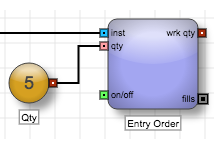
Example: The Number block outputs a number that is used by the Order block to set the order quantity.
Block properties
To customize the block, update the Block Properties.
| Property | Description |
|---|---|
| Name | Name to display beneath the block on the ADL canvas |
| Default Value |
Default value to use when configuring an algo instance. Note: This value pre-populates the value in the in the Variables tab. Changing the value in the Variables tab while testing user-defined variables only changes the block value for the algo currently running in the canvas; it does not affect the default value defined for the block. |
| Variable Type |
Method to set the value:
|