

Use the Exchange Properties tab to configure exchange-specific account properties, such as account code mappings and clearing instructions for exchanges that have specific order routing requirements per account.
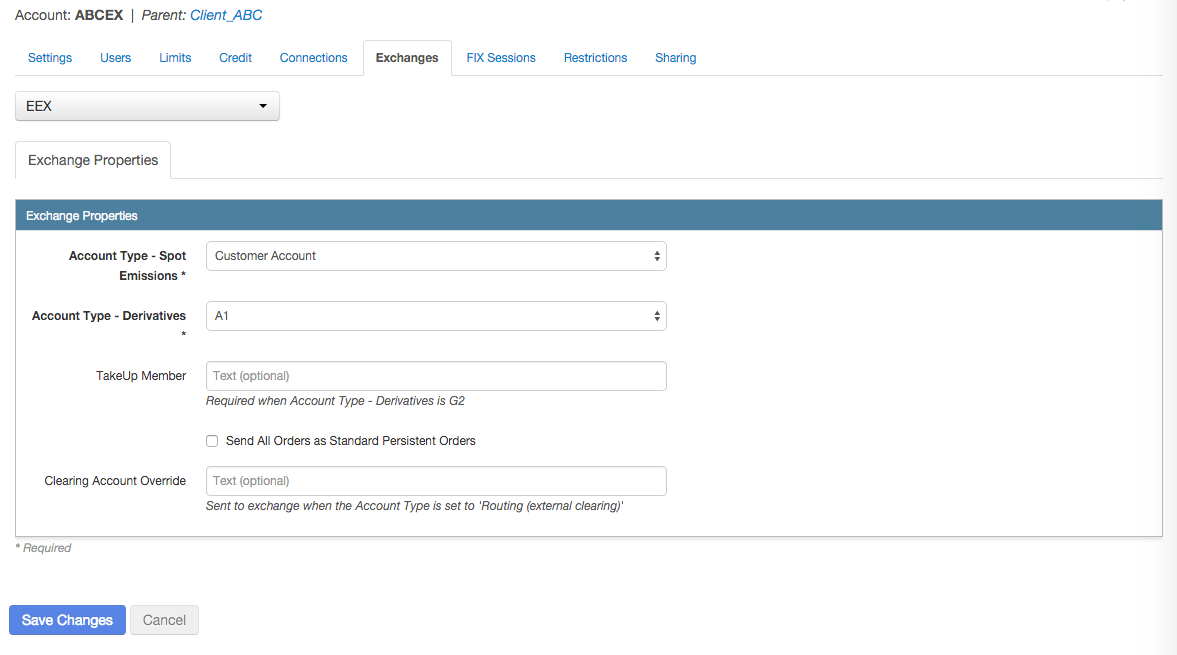
To configure account exchange properties:
- Click Accounts in the left navigation pane and select an account in the data grid.
- Click the Exchanges tab for the selected account.
- Click the Select an Exchange selector to find and select an exchange.
- Configure the settings in the Exchange Properties section.
Settings vary by exchange. Click the following exchanges for details about configuring the related settings: ABX, ASX, ATHEX, B3, BIST, BrokerTec, CBOE, CFE, Coinbase, DGCX, EEX, EPEX SPOT, Eris, Eurex, Euronext, Fenics, FEX, FMX, FMX_USTF, GFOX, HKEx, ICE, ICE_L, JPX, JSE, LME NTP, LSE, MEFF, MexDer, MIAX_FUT_CH, MX, NDAQ_EU, NASDAQ_NED, NFI, NFX, Nodal, Nord Pool, NZX, SGX, SGX GIFT City, TAIFEX, TFEX, TFX
- Click Save Changes.